> ## Documentation Index
> Fetch the complete documentation index at: https://docs.promptfoundry.ai/llms.txt
> Use this file to discover all available pages before exploring further.
# Deploying
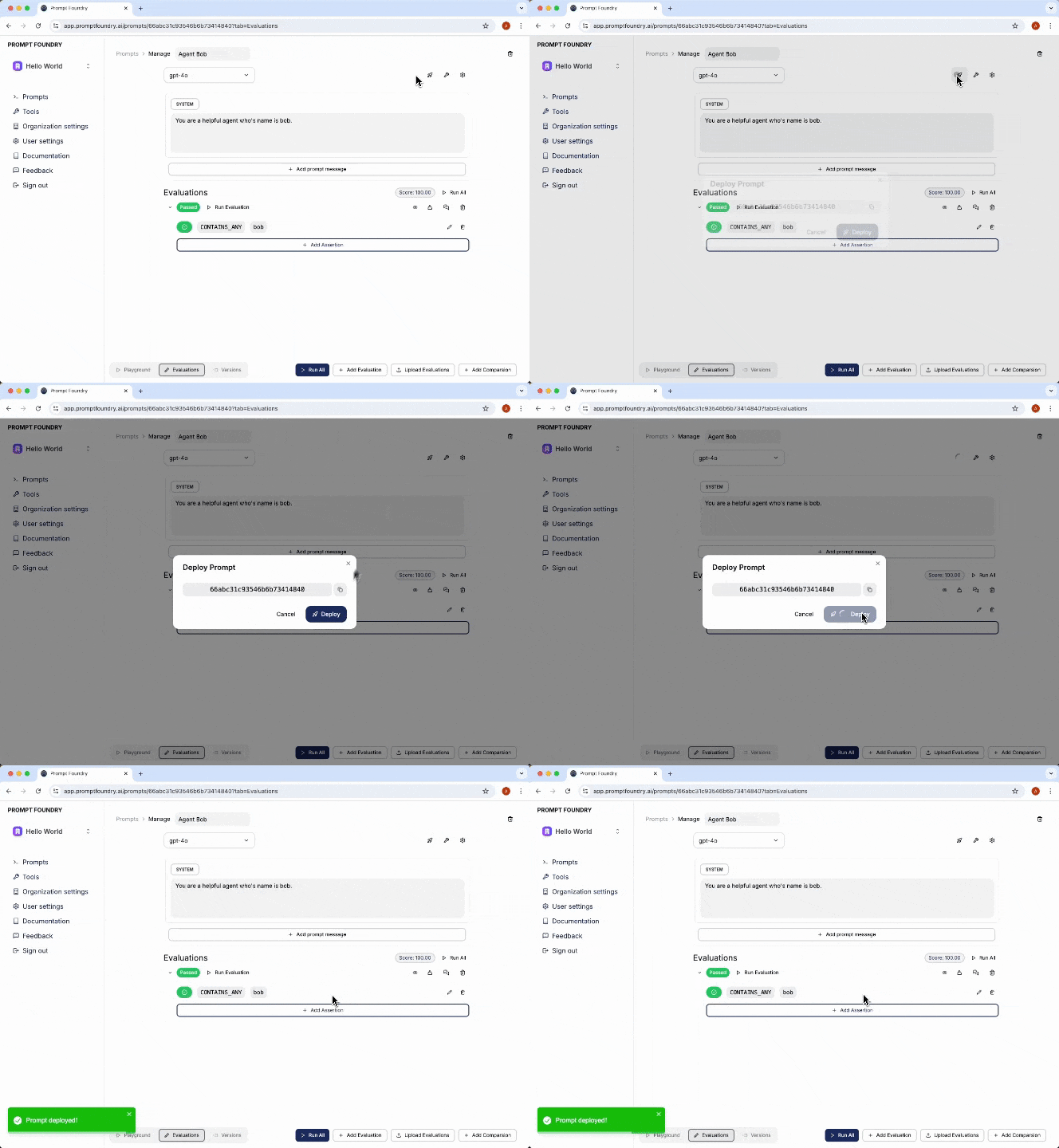
You've created and tested your prompt, and now you're ready to deploy it to your production environment.
Click the "Deploy" button in the prompt editor to deploy your prompt to the
production environment.
 Navigate to the ["API
Keys"](https://app.promptfoundry.ai/organization#/api-keys) section in your
organization settings and create a new API key. Be sure to save it as a
secure environment variable or in a secret manager before closing the tab,
as you will not have access to it again.
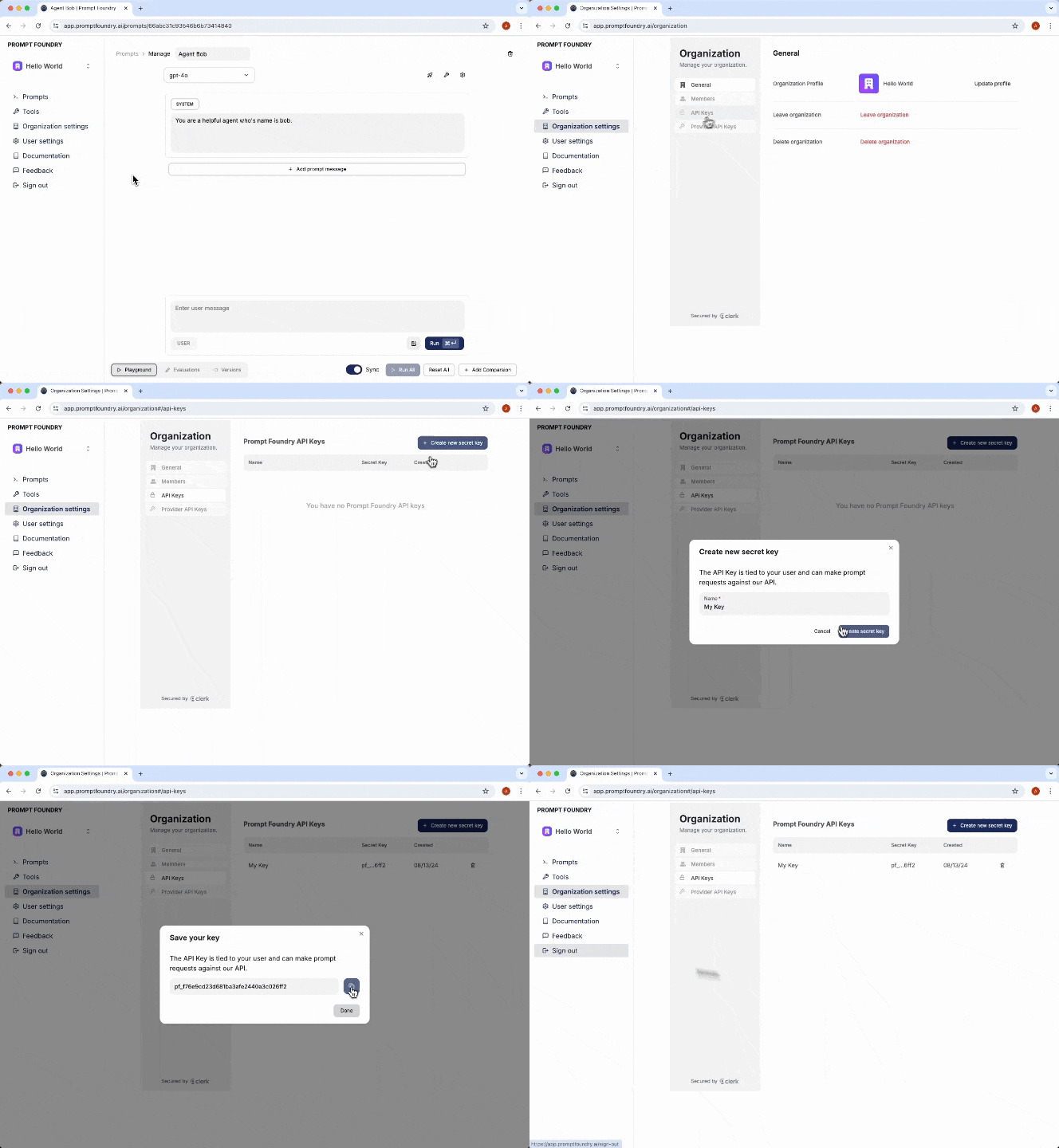
Navigate to the ["API
Keys"](https://app.promptfoundry.ai/organization#/api-keys) section in your
organization settings and create a new API key. Be sure to save it as a
secure environment variable or in a secret manager before closing the tab,
as you will not have access to it again.
 Now, install the PromptFoundry SDK in your application.
```bash Node.js theme={null}
npm install @prompt-foundry/typescript-sdk
```
```bash Python theme={null}
pip install prompt_foundry_python_sdk
```
Integrate the SDK into your provider call to start using your deployed prompt.
Initiates a completion request to the configured LLM provider using specified parameters and provided variables.
This endpoint abstracts the integration with different model providers, enabling seamless switching between models while maintaining a consistent data model for your application.
This option requires you to add a provider API key in your [organization settings](https://app.promptfoundry.ai/organization#/provider-api-keys).
```typescript Node.js theme={null}
import PromptFoundry from '@prompt-foundry/typescript-sdk';
// Initialize Prompt Foundry SDK with your API key
const promptFoundry = new PromptFoundry({
apiKey: process.env['PROMPT_FOUNDRY_API_KEY'],
});
async function main() {
// Retrieve model parameters for the prompt
const completionCreateResponse = await client.completion.create('637ae1aa8f4aa6fad144ccbd', {
// Optionally append additional messages to the converstation thread on top of your configured prompt messages
appendMessages: [
{ role: 'user', content: [{ type: 'TEXT', text: 'What is the weather in Seattle, WA?' }] },
],
// Supports prompt template variables
variables: {},
});
// completion response
console.log(completionCreateResponse.message);
}
main().catch(console.error);
```
```python Python theme={null}
import os
from prompt_foundry_python_sdk import PromptFoundry
client = PromptFoundry(
# This is the default and can be omitted
api_key=os.environ.get("PROMPT_FOUNDRY_API_KEY"),
)
completion_create_response = client.completion.create(
id="1212121",
append_messages=[{
"role": "user",
"content": [{
"type": "TEXT",
"text": "What is the weather in Seattle, WA?",
}],
}],
)
print(completion_create_response.message)
```
Fetches the configured model parameters and messages rendered with the provided variables mapped to the set LLM provider.
This endpoint abstracts the need to handle mapping between different providers, while still allowing direct calls to the providers.
```typescript Node.js theme={null}
import PromptFoundry from "@prompt-foundry/typescript-sdk";
import { Configuration, OpenAIApi } from "openai";
// Initialize Prompt Foundry SDK with your API key
const promptFoundry = new PromptFoundry({
apiKey: process.env["PROMPT_FOUNDRY_API_KEY"],
});
// Initialize OpenAI SDK with your API key
const configuration = new Configuration({
apiKey: process.env["OPENAI_API_KEY"],
});
const openai = new OpenAIApi(configuration);
async function main() {
// Retrieve model parameters for the prompt
const modelParameters = await promptFoundry.prompts.getParameters("66abc31c93546b6b73414840", {
variables: { hello: "world" },
});
// check if provider is Open AI
if (modelParameters.provider === "openai") {
// Use the retrieved parameters to create a chat completion request
const modelResponse = await openai.chat.completions.create(
modelParameters.parameters
);
// Print the response from OpenAI
console.log(modelResponse.data);
}
}
```
```python Python theme={null}
import os
from prompt_foundry_python_sdk import PromptFoundry
from openai import OpenAI
# Initialize Prompt Foundry SDK with your API key
pf = PromptFoundry(
api_key=os.environ.get("PROMPT_FOUNDRY_API_KEY"),
)
# Initialize OpenAI SDK with your API key
openai = OpenAI(
api_key=os.environ.get("OPENAI_API_KEY"),
)
def main():
try:
# Retrieve model parameters for the prompt
model_parameters = pf.prompts.get_parameters(
"66abc31c93546b6b73414840",
variables={"hello": "world"},
)
# Check if provider is OpenAI
if model_parameters.provider == "openai":
# Use the retrieved parameters to create a chat completion request
model_response = openai.chat.completions.create(
**model_parameters.parameters
)
# Print the response from OpenAI
print(model_response.data)
except Exception as e:
print(f"Error: {e}")
if __name__ == "__main__":
main()
```
For more information on each SDK, visit the "Libraries" section of the documentation.
Get started with the Node.js library.
Get started with the Python library.
Now, install the PromptFoundry SDK in your application.
```bash Node.js theme={null}
npm install @prompt-foundry/typescript-sdk
```
```bash Python theme={null}
pip install prompt_foundry_python_sdk
```
Integrate the SDK into your provider call to start using your deployed prompt.
Initiates a completion request to the configured LLM provider using specified parameters and provided variables.
This endpoint abstracts the integration with different model providers, enabling seamless switching between models while maintaining a consistent data model for your application.
This option requires you to add a provider API key in your [organization settings](https://app.promptfoundry.ai/organization#/provider-api-keys).
```typescript Node.js theme={null}
import PromptFoundry from '@prompt-foundry/typescript-sdk';
// Initialize Prompt Foundry SDK with your API key
const promptFoundry = new PromptFoundry({
apiKey: process.env['PROMPT_FOUNDRY_API_KEY'],
});
async function main() {
// Retrieve model parameters for the prompt
const completionCreateResponse = await client.completion.create('637ae1aa8f4aa6fad144ccbd', {
// Optionally append additional messages to the converstation thread on top of your configured prompt messages
appendMessages: [
{ role: 'user', content: [{ type: 'TEXT', text: 'What is the weather in Seattle, WA?' }] },
],
// Supports prompt template variables
variables: {},
});
// completion response
console.log(completionCreateResponse.message);
}
main().catch(console.error);
```
```python Python theme={null}
import os
from prompt_foundry_python_sdk import PromptFoundry
client = PromptFoundry(
# This is the default and can be omitted
api_key=os.environ.get("PROMPT_FOUNDRY_API_KEY"),
)
completion_create_response = client.completion.create(
id="1212121",
append_messages=[{
"role": "user",
"content": [{
"type": "TEXT",
"text": "What is the weather in Seattle, WA?",
}],
}],
)
print(completion_create_response.message)
```
Fetches the configured model parameters and messages rendered with the provided variables mapped to the set LLM provider.
This endpoint abstracts the need to handle mapping between different providers, while still allowing direct calls to the providers.
```typescript Node.js theme={null}
import PromptFoundry from "@prompt-foundry/typescript-sdk";
import { Configuration, OpenAIApi } from "openai";
// Initialize Prompt Foundry SDK with your API key
const promptFoundry = new PromptFoundry({
apiKey: process.env["PROMPT_FOUNDRY_API_KEY"],
});
// Initialize OpenAI SDK with your API key
const configuration = new Configuration({
apiKey: process.env["OPENAI_API_KEY"],
});
const openai = new OpenAIApi(configuration);
async function main() {
// Retrieve model parameters for the prompt
const modelParameters = await promptFoundry.prompts.getParameters("66abc31c93546b6b73414840", {
variables: { hello: "world" },
});
// check if provider is Open AI
if (modelParameters.provider === "openai") {
// Use the retrieved parameters to create a chat completion request
const modelResponse = await openai.chat.completions.create(
modelParameters.parameters
);
// Print the response from OpenAI
console.log(modelResponse.data);
}
}
```
```python Python theme={null}
import os
from prompt_foundry_python_sdk import PromptFoundry
from openai import OpenAI
# Initialize Prompt Foundry SDK with your API key
pf = PromptFoundry(
api_key=os.environ.get("PROMPT_FOUNDRY_API_KEY"),
)
# Initialize OpenAI SDK with your API key
openai = OpenAI(
api_key=os.environ.get("OPENAI_API_KEY"),
)
def main():
try:
# Retrieve model parameters for the prompt
model_parameters = pf.prompts.get_parameters(
"66abc31c93546b6b73414840",
variables={"hello": "world"},
)
# Check if provider is OpenAI
if model_parameters.provider == "openai":
# Use the retrieved parameters to create a chat completion request
model_response = openai.chat.completions.create(
**model_parameters.parameters
)
# Print the response from OpenAI
print(model_response.data)
except Exception as e:
print(f"Error: {e}")
if __name__ == "__main__":
main()
```
For more information on each SDK, visit the "Libraries" section of the documentation.
Get started with the Node.js library.
Get started with the Python library.